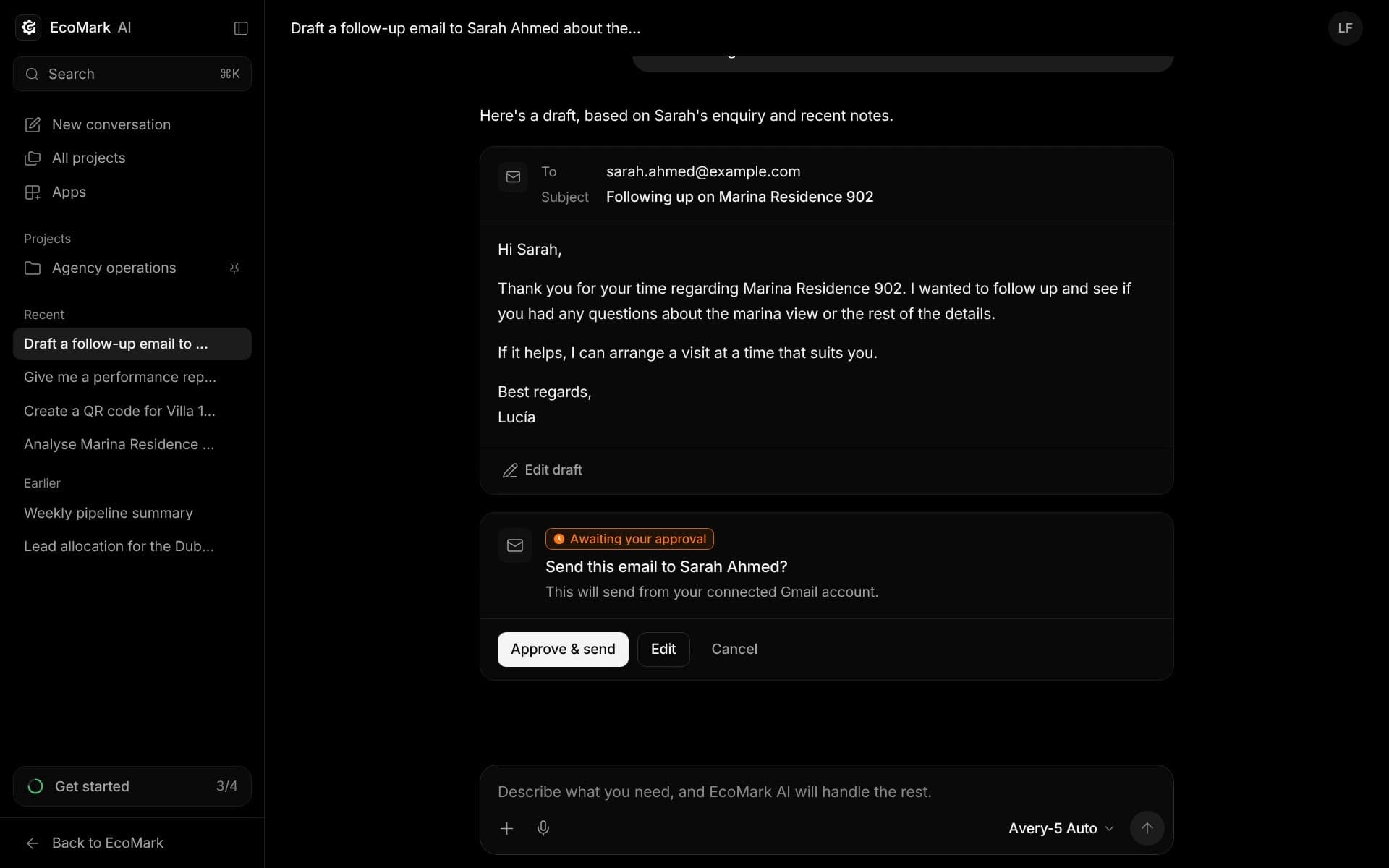
It drafts, you approve.
EcoMark AI writes the email from the lead's own history, and nothing is sent until you approve it.
Meet EcoMark AI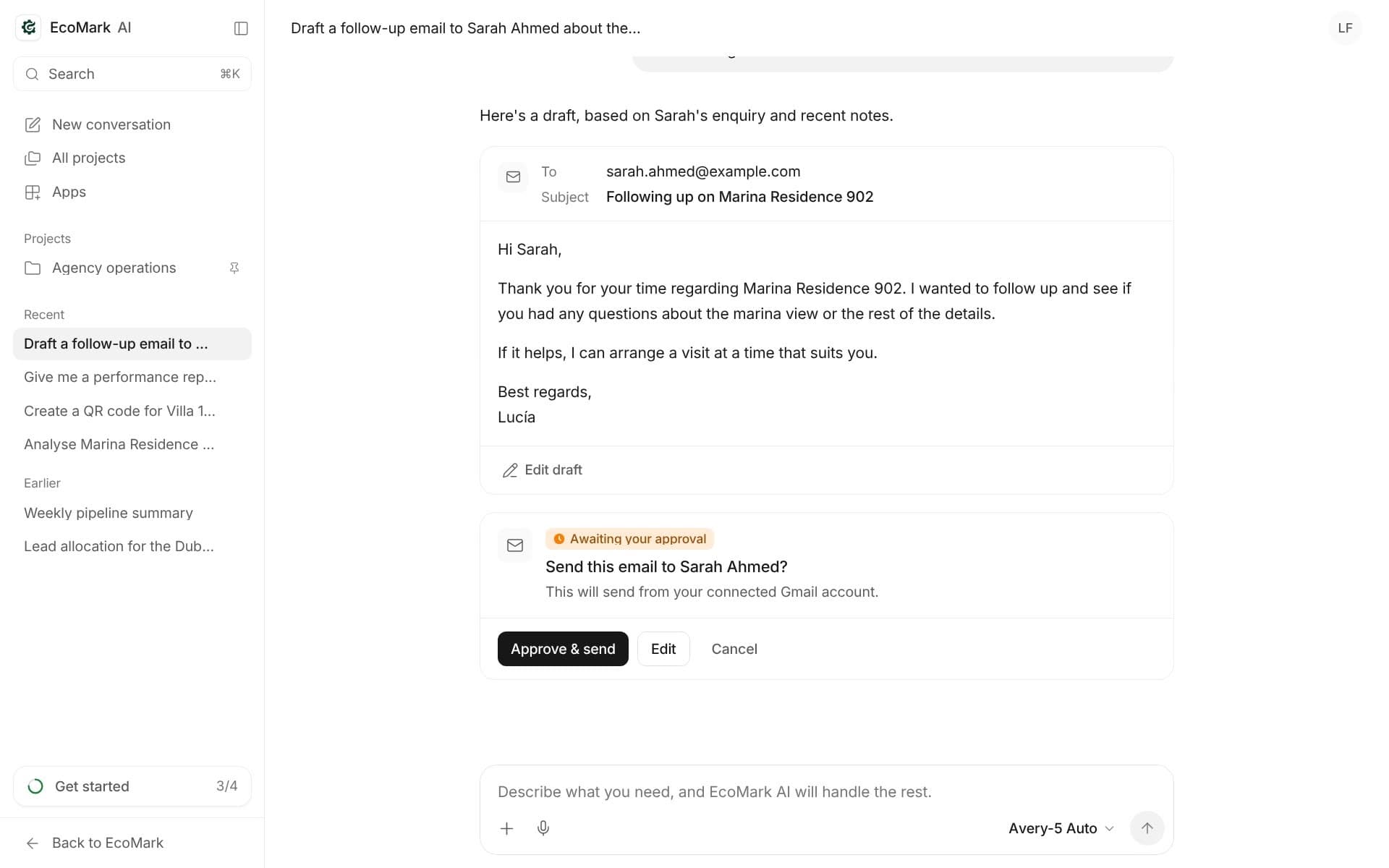
Security
What is built into the product, where each part lives, and what EcoMark does not do. It describes EcoMark's own work: nothing on this page has been audited by an outside party.
Signed in
Without a valid session, the request goes to the sign-in page.
Member of this agency
The server finds the person's membership of the agency the request is for.
Allowed by role
An agent reaches what is assigned to them or created by them. An administrator reaches the agency.
Allowed by the database
The database applies its own rule, row by row, before it returns or changes anything.
Only then does the record come back.
EcoMark AI works with the access of the member who asks it.
Row-level security on every agency's records · Private file storage for each agency · EcoMark AI cannot delete or pay
EcoMark AI writes the email from the lead's own history, and nothing is sent until you approve it.
Meet EcoMark AIRecorded in EcoMark's demonstration workspace, with sample data.
Controls
Each line says what a control means for your agency. The line under it says where it lives, or how it is checked.
A password has at least 10 characters, and an email address is verified before its first sign-in.
Checked on the server when an account is created, a password is reset or an invitation is accepted.
Signing in with Google asks Google who you are, and nothing else. It gives EcoMark no access to your mail.
The Google sign-in asks only for your name, email address and picture. Connecting a mailbox is a separate permission with its own consent screen.
A forgotten password is reset through a link sent by email. The new password is accepted only in the browser that opened the link, within 15 minutes, and only once.
A signed, short-lived proof is kept in that browser and spent with the new password. The reset form answers the same way whether or not an account exists.
Changing your password or your email address asks for your current password first.
Settings → Security.
“Sign out other sessions” signs every other device out. They lose access within the hour.
Settings → Security. Other devices' sign-ins are withdrawn and are not renewed.
There are two roles. An administrator sees the whole agency. An agent sees the leads, listings and appointments assigned to them or created by them.
Applied on the server by every page and every action. For leads, enquiries and appointments the database applies the same rule again.
Only an administrator can invite members, change roles, see billing and connect the agency's shared apps.
Enforced in the database too: an agent who tries to invite someone or to promote themselves is refused.
An agency without an active subscription cannot change anything in its workspace, even by calling the server directly.
Every action that creates or changes data checks the subscription again on the server, not only in the page.
Every record carries its agency, and the database refuses to return or change it for anyone who is not a member of that agency.
Row-level security on each table that holds an agency's records. A record cannot be moved to another agency.
Files are kept in a private store, in a folder per agency, and are shown through links that expire within an hour.
Storage rules check the agency's folder before a file is read, written or deleted. The links are signed.
EcoMark's own isolation tests sign in as members of two agencies and try to read, change and delete each other's records and files. Every attempt must be refused.
Last recorded run: 136 of 136 checks passed, on 17 September 2026, against the hosted database. They are EcoMark's own tests, not an independent assessment.
The key that can go around these rules exists only on the server. It never reaches a browser.
Read from a server-only setting. The code refuses to create it anywhere else.
Each member chooses how far their assistant may go on its own: Suggest, Prepare or Execute. Prepare is the default, and the agency sets a ceiling no member can go above.
Settings → Assistant. The agency's ceiling is applied on the server to every request.
Even at Execute, at most 8 actions and 3 messages go ahead by themselves in one request. The rest stop on an approval card.
Limits written into EcoMark's own rules for the assistant, not left to the model.
Deleting and paying are not things the assistant can do at all.
Its list of tools has neither.
Text that comes from outside (an email, a customer's message, a document) reaches the assistant fenced off and labelled as outside content, with the rule that it is information, not instructions.
A model can still be misled. That is why some actions always wait for a person, whatever the setting.
After the assistant applies something, EcoMark reads the record back and says whether it found it: “Verified in EcoMark”.
A result that could not be read back is said plainly on the receipt.
A member can pause their automations, and an administrator can pause them for the whole agency.
Settings → Assistant → Pause all.
It always asks you first
Prices and discounts, published listings, contractual commitments and signatures, payments, deleting anything, messages to many people at once, and everything that leaves through a connected app.
An app is connected on the provider's own sign-in page, so EcoMark never sees your password for it. Motion is the exception: it is connected with a key you paste.
Each provider's own authorisation flow, with the code exchange bound to your browser where the provider supports it.
The access tokens EcoMark receives are encrypted before they are stored, and are never sent to the browser.
AES-256-GCM, with a key kept in the server's settings.
A connection can only be completed by the person, and in the browser, that started it, within ten minutes.
A signed state and a short-lived cookie are checked on the way back. For an agency's shared apps, the person must still be an administrator.
Calls from the payment provider and from connected apps are accepted only when they prove where they come from.
Each provider's signature or shared secret is verified before anything is stored.
Disconnecting deletes EcoMark's copy of the tokens and asks the provider to withdraw the access, where the provider allows that.
Some providers offer no way to do it from outside. For those, remove EcoMark in the provider's own account settings.
Cards are entered on the payment provider's own pages. EcoMark stores only the card's brand, last four digits and expiry date.
Checkout and the billing portal are hosted by Stripe.
A workspace opens only when the payment provider confirms the payment to EcoMark's server. A link, a page or a form field cannot open it.
Only the provider's signed notification, or a check the server makes with the provider, records a subscription. Members' sessions cannot write one.
Only what an agency has published appears on its public pages, and only while its subscription is active.
One rule decides what is public, shared by the pages, short links and QR codes. Private fields are left out.
Uploads are checked for type, extension, size and content before they are kept.
A file whose content does not match the type it claims is refused and removed.
EcoMark's pages cannot be shown inside another site's frame, and browsers are told to reach EcoMark only over an encrypted connection.
Every response carries X-Frame-Options, Strict-Transport-Security (one year), X-Content-Type-Options, Referrer-Policy and Permissions-Policy.
EcoMark's staff tools (a support inbox, and a queue for WhatsApp messages that could not be matched to an agency) have their own sign-in and a named list of staff.
An agency's session never opens them, and a staff sign-in gives no access to any workspace.
They have no screen for browsing an agency's records and no way to sign in as one of its members.
The project's own tests check that the staff tools never use a member's session or an agency's context.
Limits
Stated as facts, so you can decide with them.
There is no second step at sign-in: the “Two-factor authentication” switch in Settings is disabled. There is no single sign-on, passkey or sign-in by emailed link, and an account is not locked after failed attempts.
Settings shows the device you are on. It does not list your other devices or past sign-ins.
No outside firm has audited EcoMark or tried to break into it, and there is no paid programme for reporting vulnerabilities.
EcoMark holds no security or compliance certification of any kind.
The browser's content security policy reports what it would block, and blocks nothing.
Uploaded files are checked for type and content. They are not scanned for malware.
An export of your data, or the deletion of a workspace, is an email to info@ecomarkai.com, not a button. A deletion is confirmed with an administrator before anything is removed.
Nothing in a workspace is deleted on a timer, except a note EcoMark AI was asked to remember for a set time. EcoMark makes no commitment about the country where data is stored, and offers no availability commitment or service level agreement.
EcoMark's servers read what they store in order to work: search, the assistant and messaging all need to. The tokens of connected apps are what EcoMark encrypts itself.
Read this page for what it is
Everything above is EcoMark describing its own work: what the code does, and what EcoMark's own tests check. No one independent has reviewed it. A design can be built with care and still have a flaw nobody has found, and no outside party has looked for one yet. The page also covers only what the application's code shows; how access to EcoMark's own hosting and database accounts is restricted is an operational matter it does not describe. If you need more than this page says, ask us.
Report a problem
Send what you found, the steps to reproduce it and the address involved to info@ecomarkai.com. It is the same inbox as every other request: there is no separate security address and no bug bounty.
Email info@ecomarkai.comWhere to read more
Create your workspace, or ask the team about security before you start.